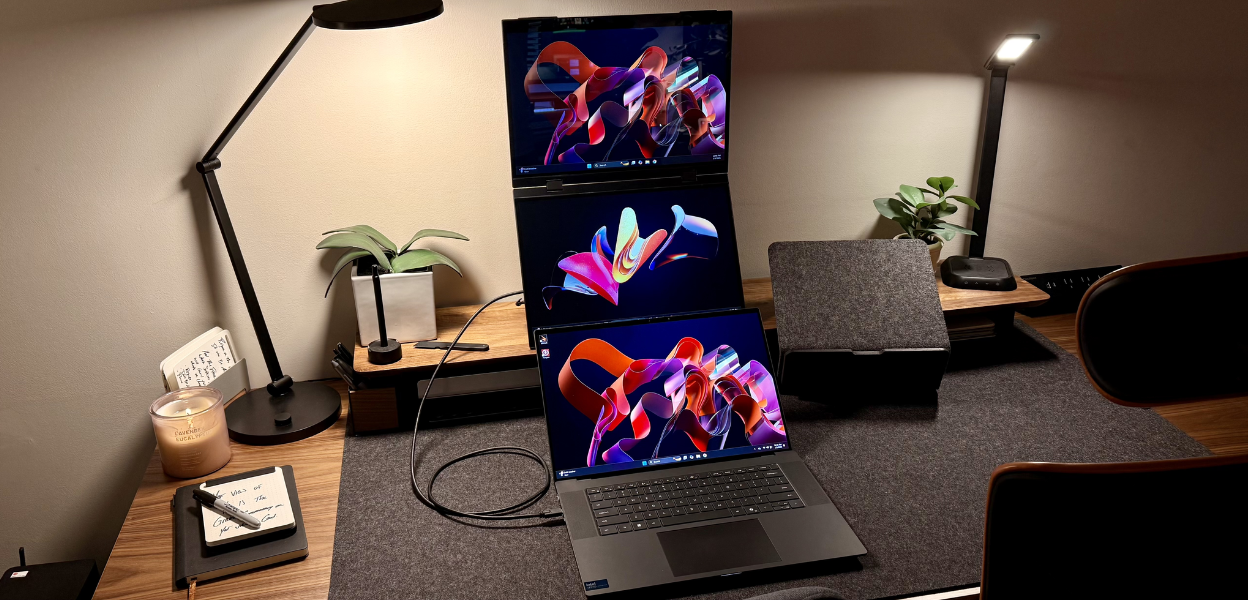
Why the Uperfect Delta Pro Touch Dual Monitor Feels Built for Focus
This dual 16 inch touch monitor by Uperfect reshapes what mobile setups can do with its stacked design pressure pen and seamless screen switching.
The pressure to stay productive across multiple tasks has pushed screens to do more than just display. The Uperfect Delta Pro Touch steps into that demand with dual 16-inch QHD panels, full touch control, and an intuitive foldable layout. It gives users a new kind of flexibility by creating more visual space without taking over their desk or backpack.
From creatives handling edits to professionals coordinating windows, the Delta Pro Touch becomes a focused environment on its own. It strips away the clutter of external accessories and replaces it with direct touch input and built-in control.
Dual Panels That Multiply Your Workflow
Two vertically stacked screens feel natural in a world where multitasking now includes design, communication, data, and research all happening together. Each panel runs at 2560 x 1600 resolution with a 16:10 ratio, offering clean visuals without crowding or distortion. This resolution gives enough clarity to keep fonts sharp, colors accurate, and visuals defined from corner to corner.
With support for capacitive pen input and finger gestures, the monitor transitions smoothly into sketch mode, editing mode, or full-screen media playback. These are the kind of layered interactions missing from most setups, and they become essential for people who treat visual space as creative territory.
A Mobile Monitor That Actually Travels Well
For anyone working across locations, a mobile monitor should offer more than portability. It should set up fast and operate independently without needing drivers or extra steps. The Delta Pro Touch gets there with a one-cable connection that runs through a single Type-C or mini HDMI. No installation, no pairing process, no second-guessing compatibility.
Its internal stand locks into place without tipping. The weight sits just under five and a half pounds, making it compact enough for a backpack but solid enough to stay upright on a shared workspace, café table, or home desk. It supports both landscape and portrait display on the top panel with gravity-sensing auto-rotation, helping users change angles fast when switching from spreadsheet work to vertical reading.
Responsive Touch That Handles More Than Taps
Touch functionality on both screens works at a 10-point level, with input mapped accurately for actions like scrolling, pinching, or dragging files. Where this monitor pushes further is with its pressure-sensitive pen.
The pen reads depth, tilt, and pressure to reflect each stroke with natural variation. This is useful for drawing lines that look hand-rendered instead of digital, or annotating files with gestures that match how people sketch or mark by hand. For those who lean on visual thinking to build concepts or finalize edits, this type of tool can shape the way they capture and process ideas.
Designed for Focus Not Distraction
Every design choice in the Uperfect Delta Pro Touch pulls focus inward instead of adding more to juggle. Cables sit flush to the sides. Each screen adjusts angle and position through a built-in hinge. No external stand is needed. No dongle or external hub has to be configured. The unit supports dual displays from one cable, helping users keep their workspace quiet and streamlined.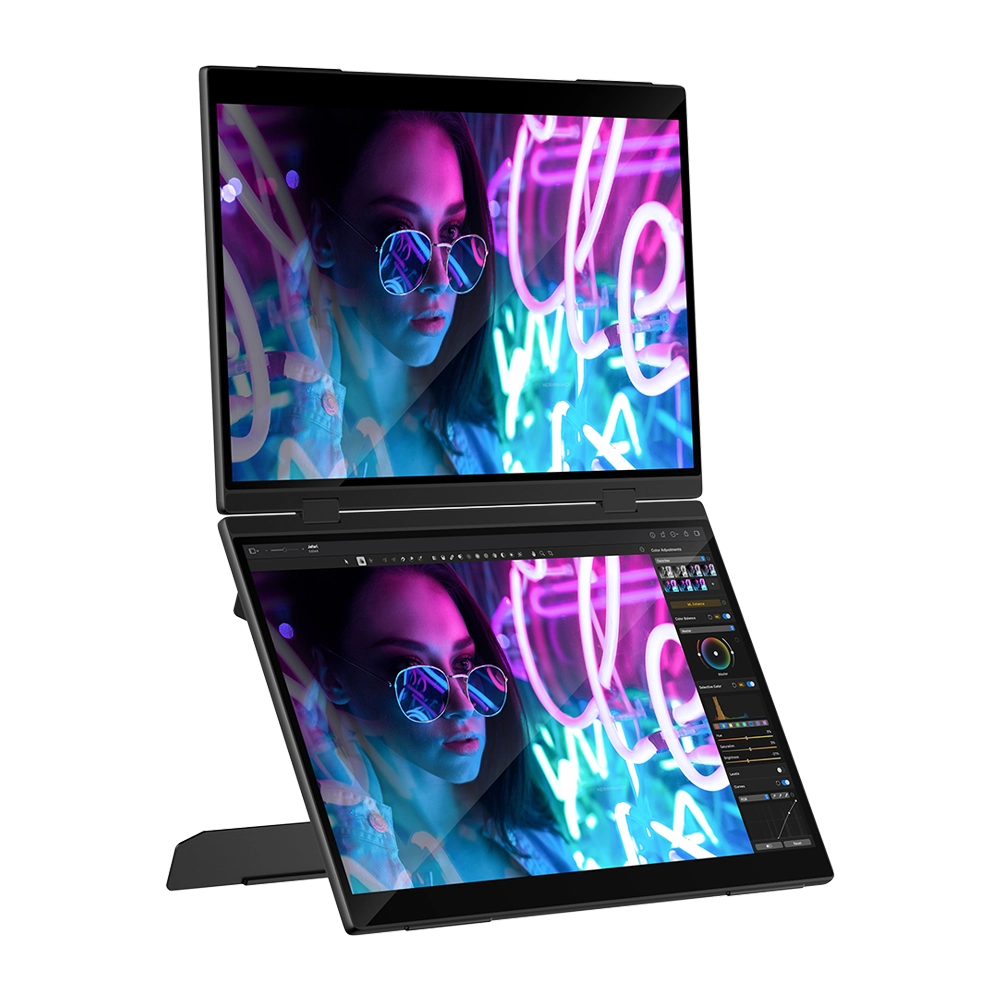
Its refresh rate holds steady at 60Hz, enough to maintain smooth visuals in meetings, playback, and project work. Built-in speakers cover the basics for audio, especially during travel or remote sessions, even if external headphones offer better depth. By folding in on itself, the structure keeps both screens safe in transit. It opens with minimal effort into a stacked format that keeps eyes at the same level and reduces constant head turns between devices.
Color Depth That Matches Design Workflows
Each screen supports 100% of the sRGB color space, which means every shade gets represented with accurate consistency. Images look lifelike, tones stay vibrant, and dark-to-light transitions hold up without banding. For users who work on visuals, this color profile ensures edits reflect true tones across devices.
Designers who preview content for print, digital, or branding find this particularly useful. The ability to match visual quality on a mobile screen with what’s expected on primary monitors removes the need to second-check later on a larger device.
Practical In Motion but Solid on Setup
The monitor comes fully driver-free, which reduces setup to under a minute. Each port is full-featured, handling both power and display. The packaging includes both Type-C and HDMI cables, giving users everything needed to plug into laptops, gaming devices, or tablets with supported output.
It doesn’t rely on Wi-Fi or software to configure either panel. Screen extension or mirroring can be adjusted in the display settings of the connected device. On Windows, Mac, and most Linux distros, it’s recognized automatically as a second and third screen when fully extended.
The touch screen stays responsive across different OS platforms as long as the input signal supports touch, most full-featured USB-C ports do, while others require manual touch assignment through the settings.
A Travelling Monitor That Doesn’t Feel Compromised
For anyone looking to set up a travelling monitor without stepping down in resolution or usability, the Delta Pro Touch offers dual displays in a single structure with native 2.5K output on both. That gives users full-screen real estate for spreadsheets, moodboards, writing, and video editing, without any side clipping or stretch.
It integrates into remote workflows, letting people take meetings, share screens, or split work across projects without being tied to a desk. Even as remote and hybrid setups change how people structure their day, this monitor holds its place as a focused and steady part of that shift.
For those who rely on more than one device, this stackable structure becomes an anchor, a tool that centers the space and lets everything else orbit around it.
What Users Point Out
Some users mention that the touch screen’s default configuration mirrors the laptop’s main screen input unless adjusted manually. This requires assigning the touch driver to the correct screen in system settings. It isn’t a defect, but it does take a moment to fix. Others say the brightness and speakers are adequate for most uses but not designed for studio-level output.
Still, the core feedback centers around how well the dual screens hold up under real pressure, fast-moving tasks, visual planning, and location shifts. This is where the product justifies its price: not through flash, but through follow-through.
The Uperfect Delta Pro Touch isn’t built for passive screen use. It steps into tasks that demand structure, interaction, and clarity. Its stacked display, pressure-sensitive pen, and auto-aligning panels provide a quiet kind of control for users who need their tools to keep up, not hold back. The strongest feature here isn’t the resolution or refresh rate. It’s the way the monitor adapts to movement between places, projects, and priorities without forcing the user to change how they work.
As the premier partner of the Uperfect affiliate program, we would like to inform you that by tapping on the referral link, you may save big on your next purchase. We may earn a small commission without extra cost to you.
Follow FlexGlimpse, where we cover what’s next in electronics with clarity that counts.
Related Blogs

ShirtPunch Review: Fun Pop Culture Apparel and Collectibles
Looking for unique pop culture apparel? Read our ShirtPunch review to explore graphic T-shirts, hoodies, collectibles, and accessories designed for fans of gaming, anime, movies, comics, and more.

Is Commomy Decor Worth Buying For Stylish Home Furniture
Looking for stylish and practical home furniture? Read our Commomy Decor review to explore its modern furniture designs, décor collections, functional pieces, and affordable options that help create comfortable and beautiful living spaces.

Is Team Motorcycle the Best Store for Motorcycle Gear and Riding Accessories
Searching for reliable motorcycle gear? Read our Team Motorcycle review to explore its wide range of helmets, riding apparel, boots, gloves, luggage, and accessories designed for riders of every experience level and budget.