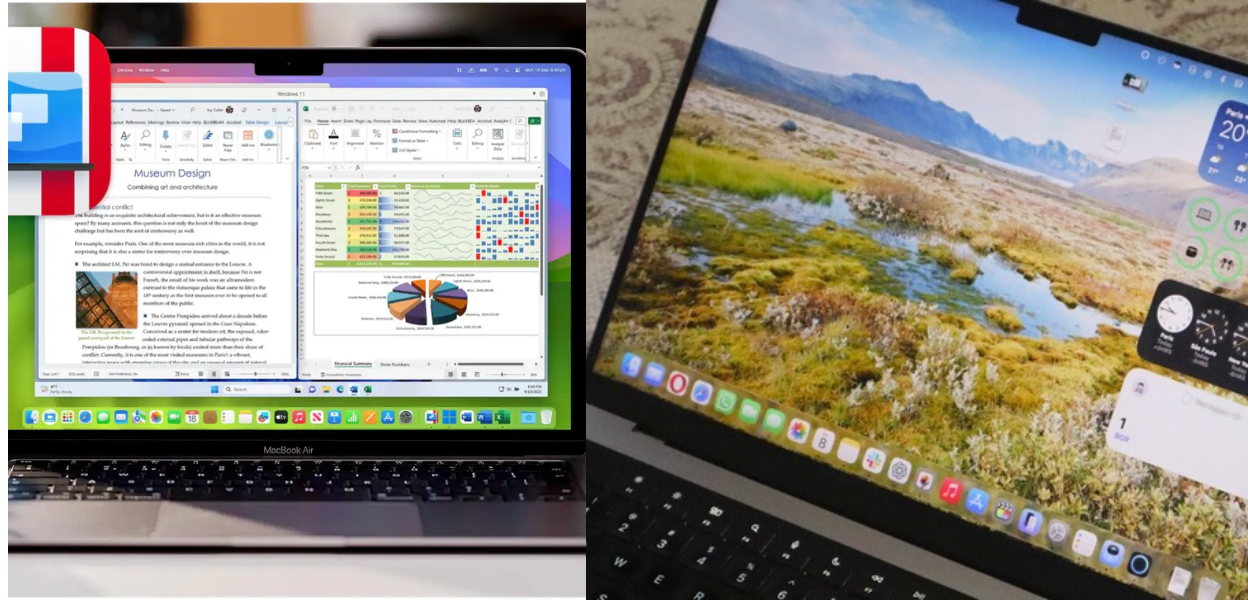
How Parallels Desktop Lets You Run Windows on a Mac Without Sacrifices
Parallels Desktop creates a seamless space where Mac users can access Windows apps without compromising performance or switching devices.
Working across multiple platforms used to mean owning more than one computer or constantly switching systems. For many people, one device isn’t enough to get everything done, especially when certain apps run only on Windows. This is where Parallels Desktop steps in, a tool built for those who rely on a Mac but still need Windows access.
Without being flashy, Parallels has created something that answers a very specific need. It brings together macOS and Windows in one workspace without demanding technical skills or a complicated setup. Still, that doesn’t mean it’s perfect for everyone.
What Parallels Desktop Does for Mac Users
The entire idea behind Parallels Desktop is simple: run Windows applications on a Mac without rebooting or using extra hardware. It creates a virtual space inside your computer where another operating system functions like it’s on its own device. Once set up, you can open Excel from Windows right next to Safari on Mac, or launch a development tool that only supports Linux, all from one screen.
For anyone working with software that doesn’t offer a native Mac version, this setup brings flexibility without needing to switch machines. You move between systems in real time, open files from both, and access apps across platforms as if they all belonged together.
The tool doesn’t demand deep tech experience, either. After a quick Parallels download, users are walked through the steps to add Windows or Linux, with prebuilt setups available if needed.
Who Should Consider Using Parallels
Parallels Desktop has broad appeal. College students often use it for software that their classes require, like Windows-only engineering tools. Developers use it for testing apps across different operating systems. Creatives might run Adobe apps side by side with video software that isn’t macOS-compatible.
For small business owners, it serves a more practical role. Many still use software like QuickBooks Pro or legacy management tools built for Windows. With Parallels, those tools don’t become obsolete just because the business switches to Mac hardware.
Power users who deal with complex workflows find value in being able to open large files, manage multiple apps, and toggle between environments without system delays. The Pro and Business editions of Parallels offer more virtual memory and CPU allocation, which can make a difference if your workload demands heavy processing.
Getting Started With Parallels Download
Installing Parallels Desktop is as smooth as the experience it tries to create. Once you complete the Parallels download, the tool scans your Mac and offers a setup based on your use case. You can install a new Windows version or use an existing license, and the software handles most of the integration without manual steps.
Within minutes, a Windows desktop appears as a virtual machine inside your Mac. You can drag and drop files between systems, use shared folders, and even launch apps from the Mac dock that actually open in Windows. The performance depends on how much RAM and processor power your Mac has, but most modern devices handle the load without struggle.
Plans and Parallels Pricing Breakdown
Three main versions of Parallels Desktop exist: Standard, Pro, and Business. Each version targets a different type of user, from casual access to enterprise-level control. Parallels pricing starts at $99.99 per year for the Standard plan. This works well for home use or individuals who want consistent access to Windows tools.
The Pro Edition steps up system capacity, unlocking more virtual CPUs and RAM, which matters when running design software, testing platforms, or handling bulk tasks. At $119.99 per year, it caters to users who want faster load times and fewer limits.
The Business Edition, priced at $149.99 annually, is built for teams. It includes centralized admin features, license management, and the ability to configure multiple devices from a single dashboard. For IT professionals or business owners managing teams, this version provides flexibility and control that goes beyond one user.
One thing to note is the difference between subscriptions and one-time purchases. A one-time license gives access without ongoing fees but doesn’t include upgrades. Subscriptions do, which could influence your choice depending on how often you want updates or new tools.
Is There a Way to Save With a Parallels Coupon Code
Deals for Parallels do exist if you know where to look. A quick search online often reveals seasonal offers or special pricing for students and educators. You might also find a Parallels coupon code shared through tech blogs or partner websites, especially around key launch dates or sales periods. These codes can cut annual costs or unlock access to premium features during trial windows.
While discounts shouldn’t drive the entire decision, using a Parallels coupon code does help when testing the platform before full commitment. It’s a small but useful way to explore without a high upfront cost.
What People Say
Feedback from actual users of Parallels Desktop helps cut through assumptions. Many report that the transition between macOS and Windows feels natural, with little lag and a clear interface. Coherence Mode, which lets Windows apps run like native Mac software, receives praise for blending systems without the usual learning curve.
Others point to setup ease and responsive support, especially on the Pro and Business tiers. Still, not all reviews are glowing. Some users note that running demanding apps in virtual machines can slow performance if Mac hardware is already stretched thin. Others question the cost of subscription-based models, especially when alternatives exist.
These insights matter because they reflect long-term use, not just the first-day experience. If performance, stability, or support quality is a priority, user feedback gives helpful indicators of what to expect. Parallels Desktop focuses on helping people run systems together without losing speed, structure, or simplicity. It’s a tool built for real-world use: daily routines, client work, creative projects, or system testing that spans more than one OS.
Its value depends on what kind of user you are. If your tasks demand apps across macOS and Windows, or if your team relies on legacy software that just doesn’t run on Mac, Parallels quietly fills that gap. The ability to run apps side by side in real time without shutting down your Mac changes how some people work entirely. Check if your system supports it, explore the trial, and weigh Parallels pricing based on how often you’ll actually use it. For many, it ends up being a bridge between ecosystems, not a replacement for either.
As the premier partner of the Parallels affiliate program, we would like to inform you that by tapping on the referral link, you may save big on your next purchase. We may earn a small commission without extra cost to you.
Follow FlexGlimpse and stay updated with practical content that helps you work smarter.
Related Blogs

Is Commomy Decor Worth Buying For Stylish Home Furniture
Looking for stylish and practical home furniture? Read our Commomy Decor review to explore its modern furniture designs, décor collections, functional pieces, and affordable options that help create comfortable and beautiful living spaces.

Is Team Motorcycle the Best Store for Motorcycle Gear and Riding Accessories
Searching for reliable motorcycle gear? Read our Team Motorcycle review to explore its wide range of helmets, riding apparel, boots, gloves, luggage, and accessories designed for riders of every experience level and budget.

Is WPL RC the Best Store for RC Vehicles and Parts
Looking for realistic and affordable RC vehicles? Read our WPL RC review to explore its wide range of hobby-grade trucks, crawlers, DIY kits, replacement parts, and upgrade accessories designed for beginners and experienced RC enthusiasts.